
Included in the iOS7 redesign is a compelling update to the look of the UISwitch. The SevenSwitch project by Ben Vogelzang provides the iOS7 design as a drop in replacement for the UISwitch in iOS5+. I wanted to use this awesome project in my iOS Titanium apps so I created the Ti.SevenSwitch module.
See it in action:
Get the module:
You can download the source at on Github or the compiled module here.
The example:
The demo:
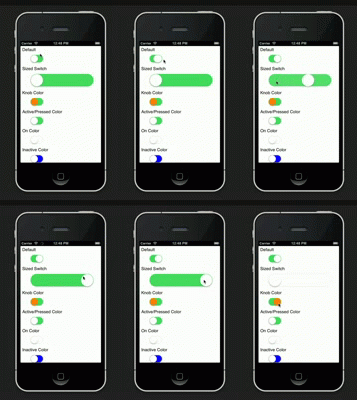
The code:
var mod = require('ti.sevenswitch');

var win = Ti.UI.createWindow({
backgroundColor:'white', layout:'vertical'
});

win.add(Ti.UI.createLabel({
text:"Default", textAlign:"left", height:25, left:7, top:0
}));

var defaultSwitch = mod.createSwitch({
top:5, left:20, value:true, height:30, width:50
});
win.add(defaultSwitch);

win.add(Ti.UI.createLabel({
text:"Sized Switch", textAlign:"left", height:25, left:7, top:15
}));

var bigSwitch = mod.createSwitch({
top:5, height:50, width:250, left:20, value:true
});
win.add(bigSwitch);

win.add(Ti.UI.createLabel({
text:"Knob Color", textAlign:"left", height:25, left:7, top:15
}));
var colorKnobSwitch = mod.createSwitch({
top:5, left:20, height:30, width:50, value:true, knobColor:"orange"
});
win.add(colorKnobSwitch);

win.add(Ti.UI.createLabel({
text:"Active/Pressed Color", textAlign:"left", height:25, left:7, top:15
}));
var activeColorSwitch = mod.createSwitch({
top:5, left:20, height:30, value:true, activeColor:"orange", height:30, width:50
});
win.add(activeColorSwitch);

win.add(Ti.UI.createLabel({
text:"On Color", textAlign:"left", height:25, left:7, top:15
}));
var onColorSwitch = mod.createSwitch({
top:5, left:20, height:30, value:false, onColor:"yellow", height:30, width:50
});
win.add(onColorSwitch);

win.add(Ti.UI.createLabel({
text:"Inactive Color", textAlign:"left", height:25, left:7, top:15
}));
var inactiveColorSwitch = mod.createSwitch({
top:5, left:20, height:30, value:false, inactiveColor:"blue", height:30, width:50
});
win.add(inactiveColorSwitch);

win.open();
 bencoding