“Any application that can be written in JavaScript, will eventually be written in JavaScript.” – Jeff Atwood
This insight from Jeff Atwood has never felt truer, especially as we witness TypeScript and JavaScript rapidly emerging as leading languages in AI agent development—an area traditionally dominated by Python.
The recent “Tiny Agents” article from Hugging Face, alongside innovations like Vercel AI SDK (1m+ weekly downloads), raises an important question: As someone that spends more time with JavasScript (preferably TypeScript) than I should it raises the question, are we seeing the rise of a new generation of developers looking to bring AI into their applications, or is this the beginning of a broader shift within AI itself?
With fewer than 50 lines of TypeScript code, developers can now create AI agents that manage workflows, access tools, and orchestrate tasks—all while integrating smoothly with APIs. Frameworks like LangGraphJS (1.3k GitHub Stars), Mastra (12.7k GitHub Stars), LlamaIndex.TS (2.6k GitHub Stars), and tools from the Vercel ecosystem highlight how accessible and developer-friendly this space has become.
Superior JSON handling: Optimizes integration with APIs, crucial for agent interactions.
Robust Async/Await Support: Ideal for handling asynchronous operations, central to AI workflows.
Unified Frontend & Backend Development: Allows developers to use one language across their entire application stack.
Examples like KaibanJS (1.1k GitHub Stars) and StageHand (11.6k GitHub Stars) further demonstrate TypeScript’s growing ecosystem for AI agents, underscoring its ability to facilitate scalable, secure, and maintainable applications.
This evolution prompts a deeper reflection: Is AI agent development becoming a core part of full-stack engineering? As tooling and frameworks continue to improve, the lines between app developer and AI developer may continue to blur.
Who owns the Product Vision in your organization, and how clearly is it defined? How does your team align on strategy, and is execution a challenge? Perhaps you’ve solved for all these elements, or maybe the relentless pace of shipping leaves little room for reflection.
In a culture dominated by the relentless mantra of “Ship-It,” there is a seductive appeal in equating velocity with progress. Speed to market can become an obsession, driven by agile rituals and iterative dogma, often causing strategy, and more crucially Vision, to be sidelined. This phenomenon isn’t merely problematic; it’s existential. Without Vision anchoring execution, organizations risk accelerating down paths that lead nowhere meaningful, sacrificing long-term competitive advantage for the transient comfort of motion.
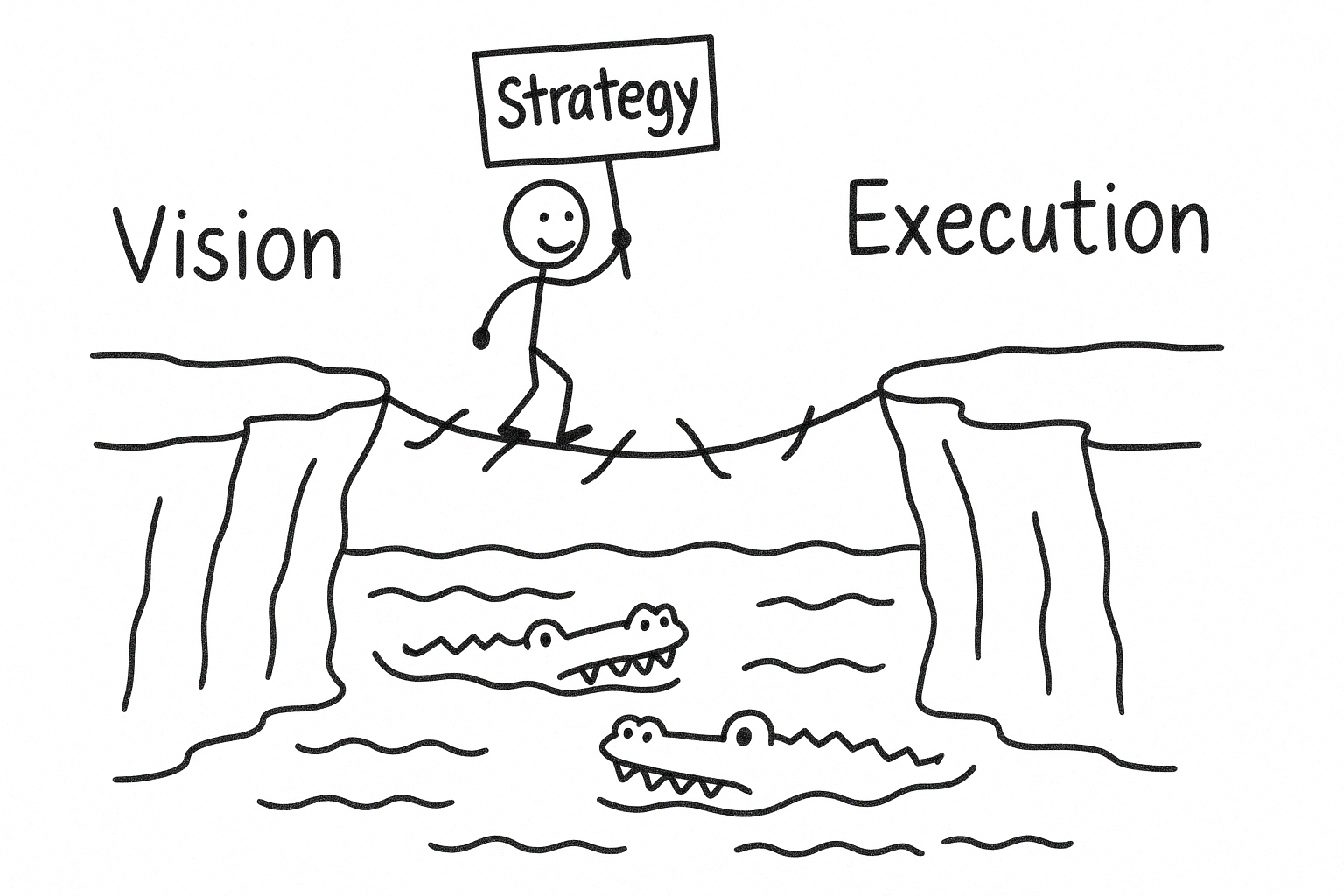
Strategy, far from being the bureaucratic nuisance it is often painted as, serves as the essential bridge between Vision and execution. It acts as the scaffolding that ensures each incremental effort compounds into sustainable differentiation rather than dissipating into disconnected efforts. Yet in the rush to deliver, strategy frequently becomes an inconvenient step, a luxury dismissed by leaders who prioritize pace over purpose. The true role of strategy is not to slow down innovation but to amplify impact by aligning each shipment with the organization’s broader goals.
Vision suffers the greatest neglect in this culture of immediacy. True Vision provides not only a north star but also an enduring framework for strategic coherence. When Vision is overlooked or undervalued, companies inevitably fragment into tactical chaos, mistaking activity for achievement. The paradox is clear: the very speed sought by a “Ship-It” culture is best achieved by clarifying Vision first, strategically aligning efforts second, and then relentlessly shipping toward meaningful outcomes.
No matter where your organization finds itself on the strategy journey, maintaining a balance between thoughtful planning and decisive action is critical. The most successful teams aren’t those who avoid missteps entirely but those who remain committed to progress, excited by the opportunity to continuously learn and refine their approach along the way.
The HP Z Book is a great development laptop for anyone that needs to build using the Windows stack. There is one minor annoyance, by default the function keys are not mapped to your standard F1 through F12.
To fix this, press fn+ctrl+shift. The standard function key behavior will then be active.
If you need to work with email in a .NET environment I highly recommend checking out MailKit by Jeffrey Stedfast. MailKit provides a higher level abstraction working across the different email protocols, which is a massive time saver.
MailKit has its own classes for handling Email Addresses. Most notability the MailboxAddress and InternetAddressList classes are returned when parsing a message envelope.
This file contains hidden or bidirectional Unicode text that may be interpreted or compiled differently than what appears below. To review, open the file in an editor that reveals hidden Unicode characters.
Learn more about bidirectional Unicode characters
As powerful as the MailKit constructs are, I typically like to convert any 3rd party types into their .NET framework equivalents. The below extension method adds a ToMailAddressCollection method to MailKit’s InternetAddressList class.
This file contains hidden or bidirectional Unicode text that may be interpreted or compiled differently than what appears below. To review, open the file in an editor that reveals hidden Unicode characters.
Learn more about bidirectional Unicode characters
Lately, I’ve been working on a project that requires some basic MLP text processing to be performed on device. A component of our text processing involved removing any trailing punctuation, no matter the language.
I’ve found the below String Extension is a good balance between effectiveness, performance, and readability. Especially if you are collecting input from users prone to excessive punctuation.
This file contains hidden or bidirectional Unicode text that may be interpreted or compiled differently than what appears below. To review, open the file in an editor that reveals hidden Unicode characters.
Learn more about bidirectional Unicode characters
This file contains hidden or bidirectional Unicode text that may be interpreted or compiled differently than what appears below. To review, open the file in an editor that reveals hidden Unicode characters.
Learn more about bidirectional Unicode characters
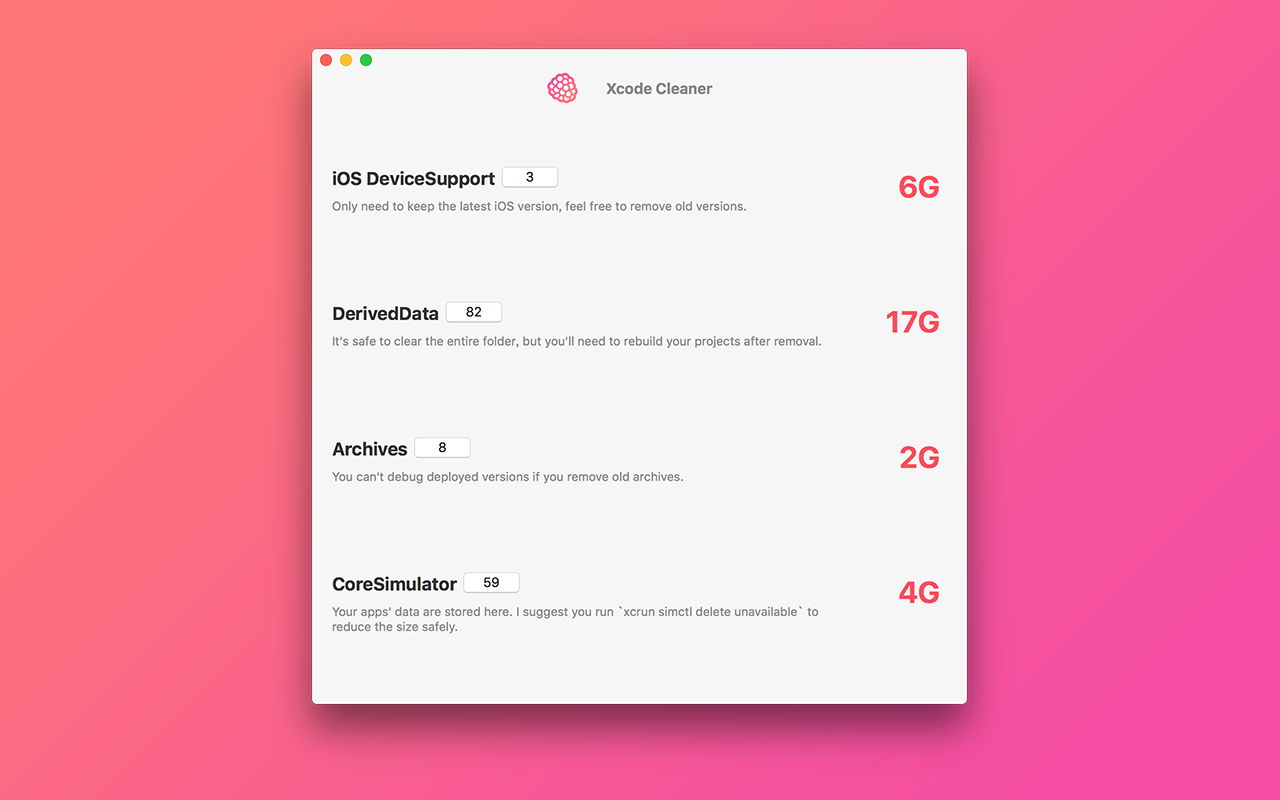
With every release of Xcode it seems to eat more and more space. I was thrilled to find the XcodeCleaner project from Baye on Github. This is a great project that allows you to tailor the space Xcode uses. I’ve been able to free up an easy 12GB without any issues.
I highly recommend checking out the project on GitHub at XcodeCleaner. You can build the project from source or download from the macOS App Store for $0.99.
Lately I’ve been working on several projects using conversational UI or “Bot” interactions. A key interaction pattern when designing “Bots” you must listen to both the intent and sentiment of the text the user is providing. Through the use of sentiment analysis you can help determine the mood of the user. This can be an important tool in determining when to offer help or involve a human. You might think of this as the “help representative” moment we are all familiar with. Using sentiment analysis you can try to offer help before that moment occurs.
There are several great sentiment analysis node.js packages but nothing I could find to run offline in Swift. A majority of the node.js projects seem to be a forks of the Sentiment package. The Sentiment-v2 package worked best for many of my cases and became my starting point.
A majority of the sentiment analysis packages available through NPM use the same scoring approach. First they parse a provided phrase into individual words. For example “Cats are amazing” would be turned into an array of words, ie [“cats”, “are”,”amazing”].
Next a dictionary of keywords and associated weights are created. These scoring dictionary is created using the AFINN wordlist and Emoji Sentiment Ranking. In a nutshell, words like “amazing” would have a positive weight whereas words like “bad” would have a negative weight. The weight of each word in the provided phrase is added together to get the total weight of the phrase. If the phrase has a negative weight, chances are your user is starting to get frustrated or at least talking about a negative subject.
Using this approach I created the SentimentlySwift playground to demonstrate how this can be done on device using Swift. This playground uses the same FINN wordlist and Emoji Sentiment Ranking weights to determine a sentiment analysis score without the network dependency. To make comparisons easier, I tried to mirror the Sentiment package API as must as possible. The below demonstrates the output for a few of the test phrases included with Sentiment.
This file contains hidden or bidirectional Unicode text that may be interpreted or compiled differently than what appears below. To review, open the file in an editor that reveals hidden Unicode characters.
Learn more about bidirectional Unicode characters
Although the APIs are similar there is one important difference between the two approaches. The SentimentlySwift playground uses NSLinguisticTagger to tokenize the provided phrase. Using NSLinguisticTagger, SentimentlySwift first parsers each word into a series of word slices. Each slice is a word tokenized using the options provided to the NSLinguisticTagger. Next the slides are enumerated and an optional “tag” or word stem is calculated. For example, in the phrase “cats are amazing”, the “amazing” word generates a word stem of “amaze”. A better example would be the word “hiking” produces the word stem of “hike”.
The following snippet shows an example on how this can be implemented.
This file contains hidden or bidirectional Unicode text that may be interpreted or compiled differently than what appears below. To review, open the file in an editor that reveals hidden Unicode characters.
Learn more about bidirectional Unicode characters
Fastlane is one of the tools that a developer shouldn’t live without. At this point it must have saved me hundreds of hours. As great as fastlane is out of the box it has a few rough edges when you introduce a WatchKit app.
Recently I added a WatchKit app into one of my projects and started getting the below error:
❌ error: The value of CFBundleVersion in your WatchKit app’s Info.plist (262) does not match the value in your companion app’s Info.plist (263). These values are required to match.
In a nutshell, Apple requires that your WatchKit app and it’s companion app share the same version. If your fastlane build includes increment_build_number these will never match by default.
Solving this problem is pretty easy, although alittle more involved then just changing your versioning system like in your core app. Hopefully the below will help people Googling for this error in the future.
Step 1: Update your Watch App’s Versioning Configurations
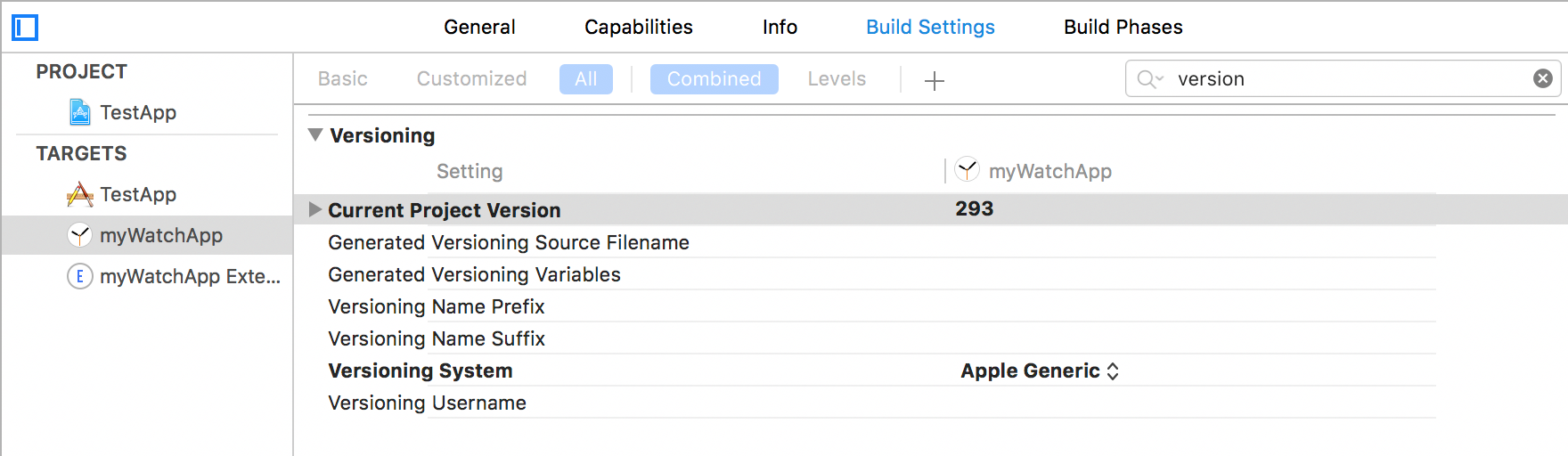
The first thing you will need to do is update the versioning configuration for your Watch App’s target.
In Xcode click on your Watch App’s target
Go to the Build Settings tab
Scroll (or search) for the Versioning section
Update the “Current Project Version” to match your core app target’s version. It is important you get this correct the first time.
Switch the “Versioning System” to “Apple Generic”
With these changes in place fastlane increment your Watch App’s Current Project Version every time increment_build_number is called. This will work just like it does in your core app target.
Step 2: Update your Watch App’s Extension Configuration
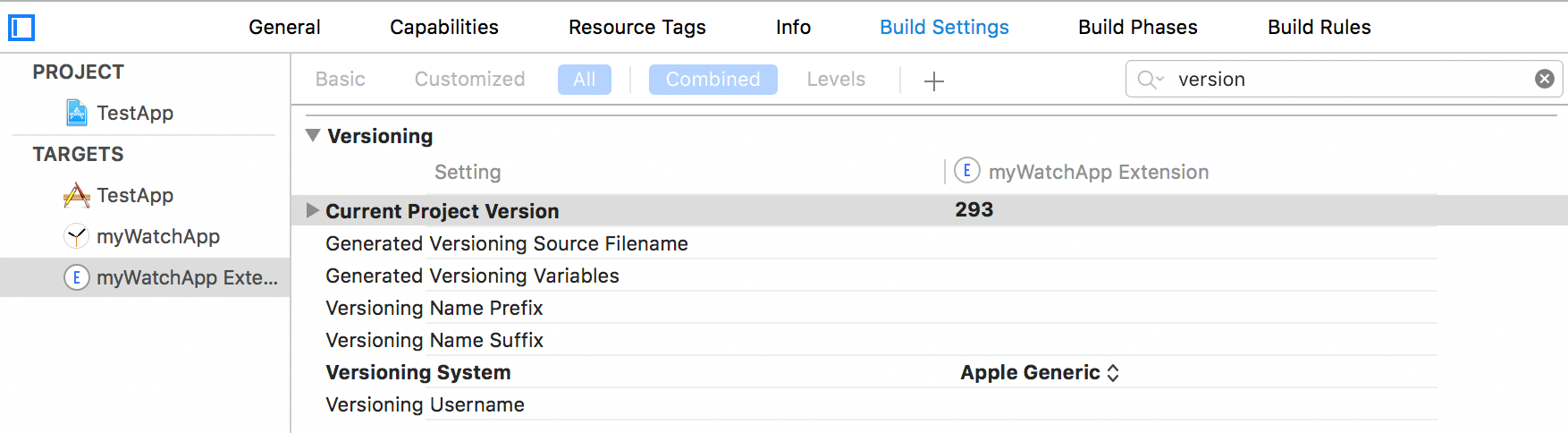
Just like step 1, you will need to update the versioning configuration for your Watch App’s extension target.
In Xcode click on your Watch App’s Extension target
Go to the Build Settings tab
Scroll (or search) for the Versioning section
Update the “Current Project Version” to match your core app target’s version. It is important you get this correct the first time.
Switch the “Versioning System” to “Apple Generic”
This again let’s fastlane increment your Watch App’s Extension when increment_build_number is called.
Step 3: Keeping your CFBundleVersion in sync
If you run your fastlane build process now you will notice you still get an error that your CFBundleVersion information does not match. Whereas fastlane is updating the Current Project Version in both your Watch App and Watch App Extension it doesn’t update their CFBundleVersion value.
The best way I’ve found to do this is to use PlistBuddy and update the CFBundleVersion as part of the fastlane build process. Below is a small convenience function created to manage the process of updating the build numbers.
This file contains hidden or bidirectional Unicode text that may be interpreted or compiled differently than what appears below. To review, open the file in an editor that reveals hidden Unicode characters.
Learn more about bidirectional Unicode characters
For my workflow I’ve incorporated the setBuildNumberOnExtension helper function into my build method that is called as part of my deployment, testing, or CI process.
This file contains hidden or bidirectional Unicode text that may be interpreted or compiled differently than what appears below. To review, open the file in an editor that reveals hidden Unicode characters.
Learn more about bidirectional Unicode characters
The same approach should work for all extensions. Even if you only have a “Today Extension” I’d recommend keeping the version numbers in sync with your core app. This will make life easier when you are debugging.
Check of the fastlane examples for more ideas on how to create extensions to improve your workflow.
How often do you convert a UIImage into a Data object? Seems like a relatively straight forward task, just use UIImageJPEGRepresentation and your done.
After doing this I started seeing memory spikes and leaks appear which got me thinking on how I can better profile different options for performing this conversion. If you want to follow along you can create your own Swift Playground using this gist.
Approaches
The first step was looking at the different ways you can convert a UIImage into Data. I settled on the following three approaches.
UIImageJPEGRepresentation
Out of all the options this is the most straightforward and widely used. If you look at the testing blocks later in the post you can see I’m simply inlined the UIImageJPEGRepresentation with the test suite compression ratio.
This file contains hidden or bidirectional Unicode text that may be interpreted or compiled differently than what appears below. To review, open the file in an editor that reveals hidden Unicode characters.
Learn more about bidirectional Unicode characters
UIImageJPEGRepresentation within an Autorelease Pool
Out of the box UIImageJPEGRepresentation provides everything we need. In some cases I’ve found it holds onto memory after execution. To determine if wrapping UIImageJPEGRepresentation in a autoreleasepool has any benefit I created the convenience method UIImageToDataJPEG2. This simply wraps UIImageJPEGRepresentation into a autoreleasepool closure as shown below. We later use UIImageToDataJPEG2 within our tests.
This file contains hidden or bidirectional Unicode text that may be interpreted or compiled differently than what appears below. To review, open the file in an editor that reveals hidden Unicode characters.
Learn more about bidirectional Unicode characters
The ImageIO framework gives us a lower level APIs for working with images. Typically ImageIO has better CPU performance than using UIKit and other approaches. NSHipster has a great article with details here. I was interested to see if there was a memory benefit as well. The below helper function wraps the ImageIO functions into an API similar to UIImageJPEGRepresentation. This makes testing much easier. Keep in mind you’ll need to have image orientation yourself. For this example we just use Top, Left. If you are implementing yourself you’ll want read the API documentation available here.
This file contains hidden or bidirectional Unicode text that may be interpreted or compiled differently than what appears below. To review, open the file in an editor that reveals hidden Unicode characters.
Learn more about bidirectional Unicode characters
UIImagePNGRepresentation is great when you need the highest quality image. The side effect of this is it has a largest Data size and memory footprint. This disqualified UIImagePNGRepresentation as an option for these tests.
Testing Scenarios
For my scenarios it was important to understand how memory is impacted based on the following:
Number of executions, i.e. what is the memory impact for calling an approach on one or many images.
How the Compression ratio impacts memory usage.
Image quality is an important aspect of my projects, so the tests where performed using the compression ratios of 1.0 and 0.9. These compression ratios where then run using 1, 2, 14, 20, and 50 executions. These frequencies demonstrate when image caching and Autorelease Pool strategies start to impact results.
Testing Each Approach
I test each of the above mentioned approaches using the template outlined below. See the gist of the details for each approach.
At the top of the method a memory sample is taken
The helper method for converting a UIImage to a Data object is called in a loop.
To make sure we are measure the same resulting data across tests, we record the length of the first Data conversion.
When the loop has completed the proper number of iterations the memory is again sampled and the delta is recorded.
There is some variability on how each approach is tested.
The implementation for each approach is slightly different, but the same iteration and compression ratios are used to keep the outcome as comparative as possible. Below is an example the strategy used to test the JPEGRepresentation with Autorelease Pool approach.
This file contains hidden or bidirectional Unicode text that may be interpreted or compiled differently than what appears below. To review, open the file in an editor that reveals hidden Unicode characters.
Learn more about bidirectional Unicode characters
I am sure there is a ton of optimizations that could be made to bring these numbers down. Overall the usage of UIImageJPEGRepresentation wrapped within an Autorelease Pool looks to be the best approach. There is more work to be done on why the compression ratio has an inconsistent impact, my guess is this is a result to caching within the test.
Although the ImageIO strategy was better in a single execution scenario I question if the proper handling of image orientation would reduce or eliminate any of your memory savings.
Caveats
There are more comprehensive approaches out there. This is just an experiment using Playgrounds and basic memory sampling. It doesn’t take into account any memory spikes that happen outside of the two sampling points or any considerations around CPU utilization.
The default behavior is for your tap or other gestures to bubble up to their child controls. This avoids the need to add a recognizer on all of your child controls. But this isn’t always the behavior you are looking for. For example imagine you create the below modal view. You want to add a tap gesture recognizer to the view itself so when your user taps the grey area it closes the modal. But you don’t want the gesture to be triggered when a tap is made on the content UIView of the modal.
This file contains hidden or bidirectional Unicode text that may be interpreted or compiled differently than what appears below. To review, open the file in an editor that reveals hidden Unicode characters.
Learn more about bidirectional Unicode characters
So that the UITapGestureRecognizer isn’t triggered when a tap is made to the content UIView we simply need to add protocol method to restrict the tap to the view it is associated with.
This file contains hidden or bidirectional Unicode text that may be interpreted or compiled differently than what appears below. To review, open the file in an editor that reveals hidden Unicode characters.
Learn more about bidirectional Unicode characters
Below is the full code associated with the modal UIViewController. If you are not familiar with how to create a modal UIViewController I would recommend checking out Tim Sanders tutorial here.
This file contains hidden or bidirectional Unicode text that may be interpreted or compiled differently than what appears below. To review, open the file in an editor that reveals hidden Unicode characters.
Learn more about bidirectional Unicode characters









 bencoding